
Companies
Your next great team starts here.
Find professionals for your busiest days. Publish a shift, choose who joins and keep track of the work in Aplyk.

More hands. Right when you need them.
Cover an absence, prepare for an event or plan for a busy season. Start with the role and the hours you need.
A clear shift gets things started.
Set the pay, hours, workplace and requirements so professionals can decide whether the work fits.
Work and location
Explain the duties, workplace and arrival instructions. Include clothing or equipment if the role requires it.
Hours and pay
Specify start and end times, offered pay and headcount. Professionals need these details to decide.
Requirements
Distinguish mandatory from preferred requirements: relevant experience, languages, documents, licences or certificates.
Find the people who fit the role.
Let professionals see what the job needs. Experience, availability and required checks help them decide whether to apply.
A notification is not an assignment
Receiving an opportunity lets the professional review it. A place is reserved only when their application is accepted.
Requirements have consequences
A mandatory requirement can prevent an application. Specify what the role actually needs so eligibility reflects the work.

Your team. Your choice.
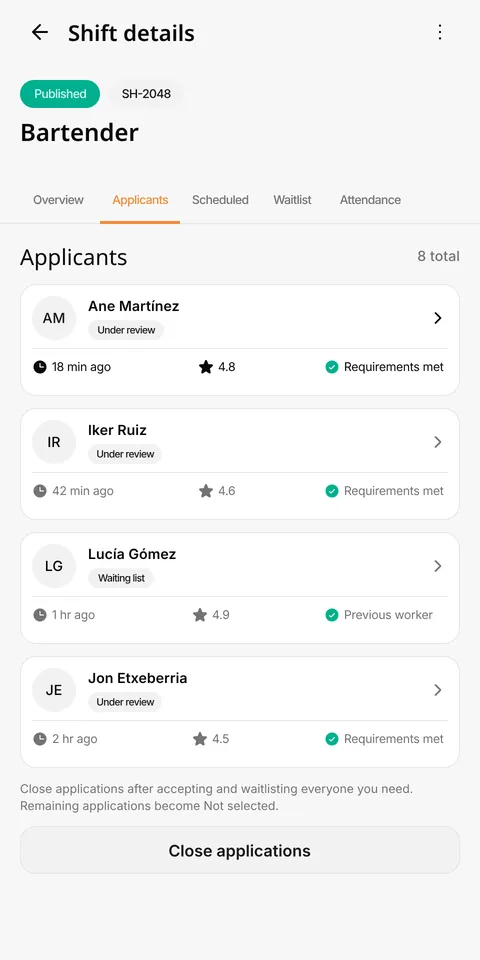
Review applications yourself or accept eligible applicants automatically while places remain. See who is accepted and who is waiting.
Manual review
Review applications and decide whom to accept or waitlist. Closing applications marks the remaining pending applicants as not selected.
Automatic acceptance
The first applications that meet the requirements are accepted while capacity remains. The app rechecks eligibility and available places.
A place opens again
Before the shift starts, you can accept an eligible person from the waiting list. There is no automatic promotion or replacement guarantee.
Get ready for your first shift.
Prepare your company details and work locations. Once the company review is complete, you can publish.
Know how the shift is going.
See assigned professionals and follow their clock-in and clock-out records in one place.
Before the start
Review scheduled professionals and the details of the work they will do.
During the shift
Distinguish people who have not clocked in from those who have started or finished.
After the shift
Review recorded duration and attendance that still needs attention. These records do not process payroll or replace your company's obligations.
Busy again? Start with what worked.
Save duties and requirements as job profiles. Use templates to prepare new dates, then review the details for each shift.
A starting point for each shift
Start with saved conditions and review the date, headcount and details for that staffing need.
Each date is independent
Repeat postings create shifts with their own applications, places and attendance. Accepting someone for one date does not assign them to later dates.

Know what has been checked.
Identity and right-to-work checks come before applications. Role-specific documents and requirements add context.
Each check has a scope
Evidence may need manual review. A verified identity does not mean every skill is certified.
Feedback follows the work
After completion, company and professional can rate each other. Ratings provide context without guaranteeing future performance.
The coordination is here. The hiring is yours.
Your company handles contracts, workplace onboarding and direct payment. Aplyk helps you coordinate the shift.
In Aplyk
Shift publication, applications, assignments, attendance records and ratings.
With your company
Contract, workplace onboarding, work instructions and professional payment. Aplyk does not process wages, payroll or social-security contributions.
Before your first shift.
Your next shift is one download away.
A new face on your team. A new opportunity in your week. Download Aplyk and create your profile.