
Professionals
Make room for work that fits.
Find shifts with pay, hours and location upfront. Bring your experience. Choose what works for you.

Work around your world.
Consider the hours, the journey and the role. Find opportunities that fit the time and experience you have.
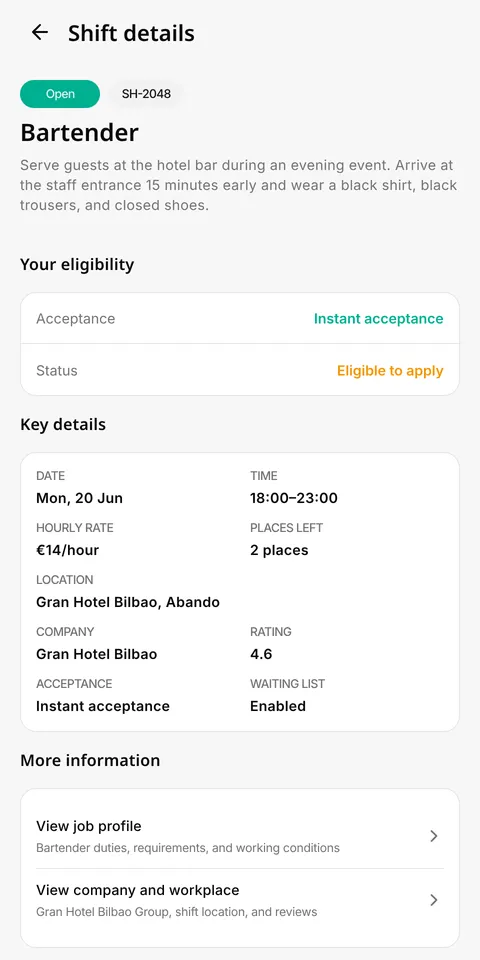
Know the shift before you say yes.
Check the pay, hours, workplace and requirements before applying. Make your next move with the details clear.
Pay and hours
Check the offered pay, date and start and end times. Consider the whole shift before applying.
Location and instructions
Check the workplace, how to get there and the company's instructions. Allow for your journey.
Duties and requirements
Review the tasks, experience needed and any required documents, clothing or equipment.
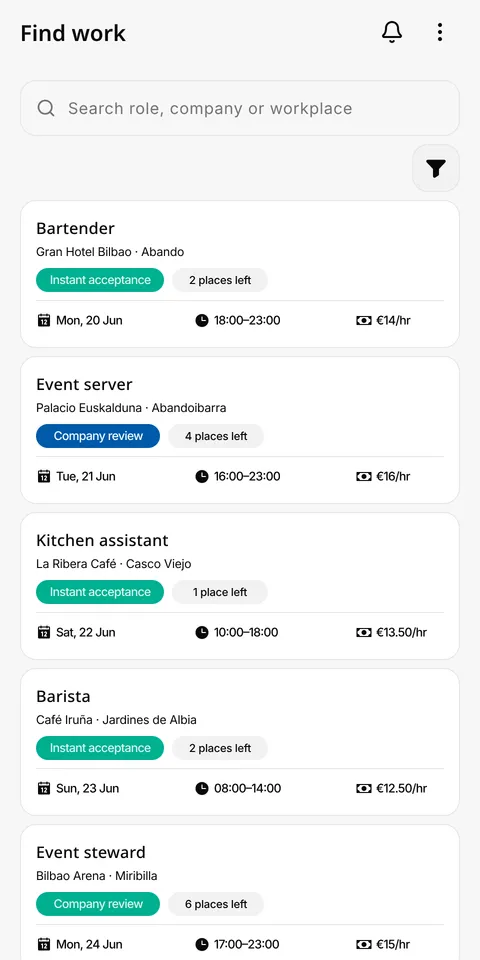
Find your kind of shift.
Keep your roles, work area and availability up to date to find relevant opportunities.
From opportunity to detail
You can reach a shift by browsing the app or receiving a notification. Always review conditions and requirements before applying.
Seeing a shift does not mean you can apply
Applying depends on required checks, role requirements and possible overlaps with other accepted shifts.
You bring the experience.
Give companies a picture of what you can do. Add your work history, availability and the documents each role requires.
Experience and availability
Prepare your work history and the roles that interest you. Set when you can work and the area that suits you.
Role documents
Have your CV and any required documents or certificates ready. Some roles may ask for video answers to questions.
Pending checks
Uploading a document does not mean it has been reviewed. Check its status and complete missing steps before applying.

Find it. Apply. Follow the result.
Browse opportunities, complete the required checks and apply when the shift fits.
Your next shift, close at hand.
Review applications and accepted work in My Shifts. The date, location and instructions stay together.
Check before you leave
Review the date, location and company instructions. Check what you need to bring for the role.
Commitments still apply
Changing availability does not cancel an accepted shift. The app checks for overlap to prevent applications that conflict with other assignments.
Ready for the day.
Check the instructions before you arrive. Clock in and out to keep a record of the time you worked.
On arrival
Open the assigned shift and clock in. Check that the app confirms the action.
On finishing
Clock out. The shift shows arrival and departure times and the calculated duration.
If recording fails
Do not assume it was saved. Check the result and use the available support channel if you need help.

Every shift adds to your story.
Look back at completed work and attendance records. Share feedback after the shift.
Review your activity
Distinguish completed work from pending applications and upcoming shifts.
Your feedback matters too
You can rate the company or shift experience. History and ratings do not guarantee another selection or higher pay.
Clear responsibilities from the start.
The company handles your contract, onboarding and payment. Aplyk helps you find and follow your shifts.
Identity and requirements
Checks help determine whether you can apply for a shift. Documents you need to provide also depend on the role.
Information before starting
Read the terms and privacy policy to understand responsibilities and data handling.
Before you apply.
Your next shift is one download away.
A new face on your team. A new opportunity in your week. Download Aplyk and create your profile.